
Everything your agency does, in one app.
Pulso gives your agency its own workspace. Your caregivers, your clients, your bookings. Nobody else can see them.


Or open in your browser: admin.pulso.co.in
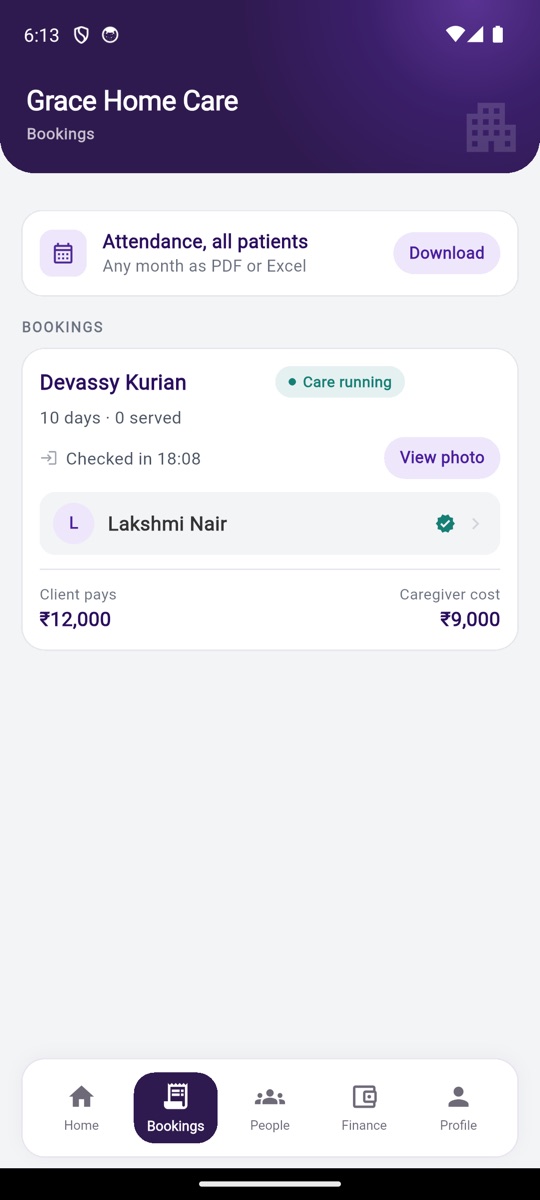
Sample agency shown.
What you can do
Caregivers
Add a caregiver in one minute. See who has opened the app. Each caregiver's qualification, city and duty preference.
Clients
Every client's details stay with you: who needs care, the care needed, the condition, the address, whom to call. Book again for the same client any time.
Bookings
"New booking", assign a caregiver, and see every booking by its state: finding the right match, assigned, active, completed, cancelled. "Book extension", "Replace caregiver", pause, stop.
Attendance
"Start OTP" at the client's home. A selfie check-in every day. Each day's time and photo, and a month view you can download.
Finance
"Payments" from clients and "Caregiver pay", by booking and by caregiver. "Mark paid". What is due from each client and to each caregiver.
Quotation and receipt
In your agency's name, as a PDF, ready to send on WhatsApp.
Anywhere
Android, iPhone, and a browser at admin.pulso.co.in. Same number, same workspace.
Step by step
Sign up.
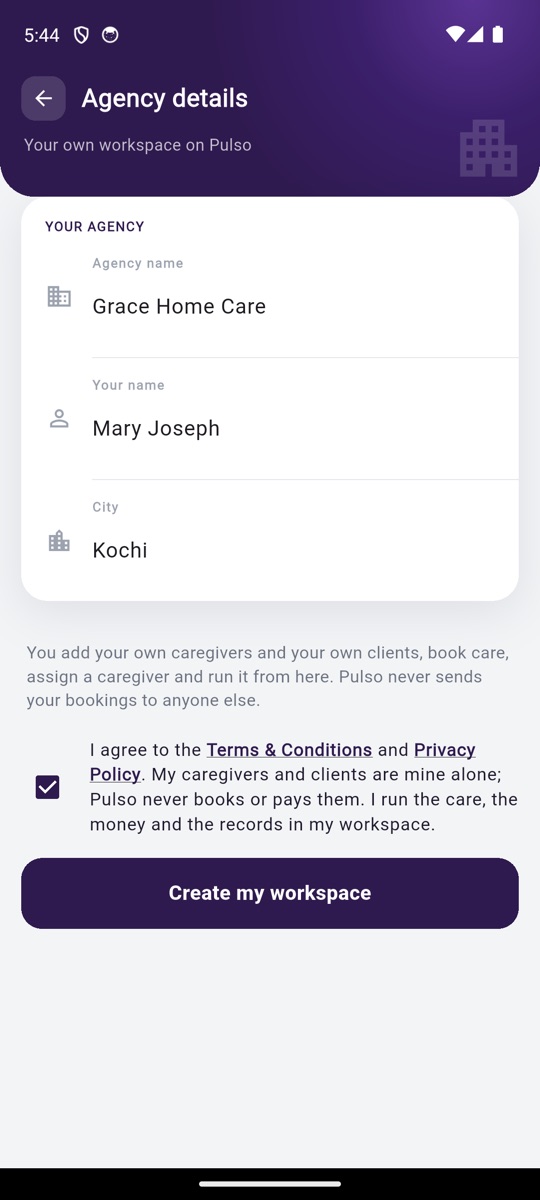
Install the app. Enter your number and the OTP. Tap "I run a caregiving agency". Fill "YOUR AGENCY": agency name, your name, city. Tick "I agree to the Terms & Conditions and Privacy Policy". Tap "Create my workspace". Your workspace opens.
Add your caregivers.
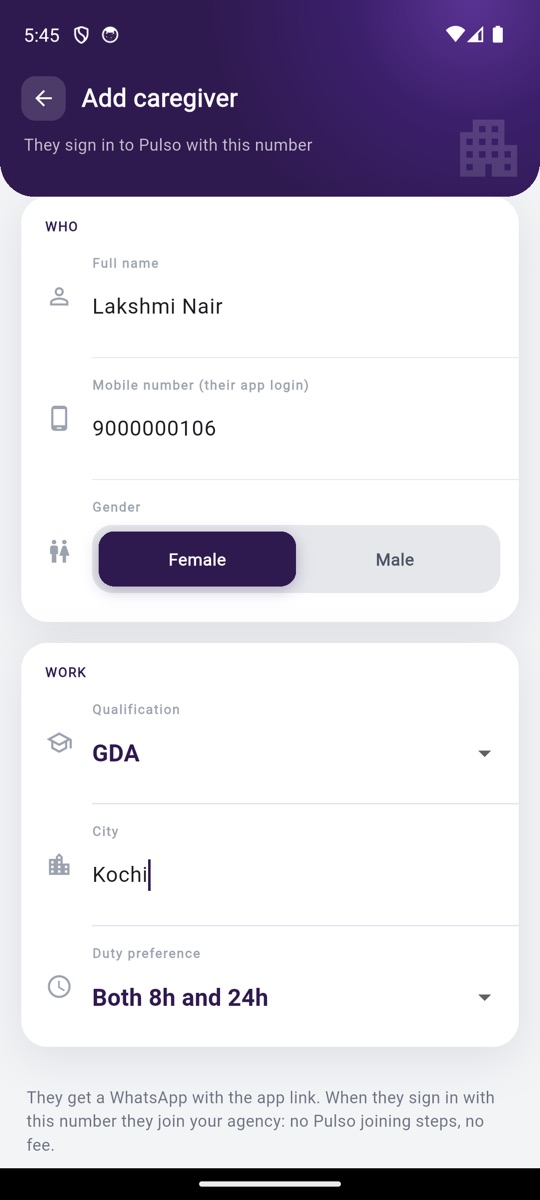
Tap "Add caregiver". "WHO": full name, mobile number (their app login), gender. "WORK": qualification, city, duty preference. Tap "Add and send app link". She gets a WhatsApp with the app link. When she signs in with this number she joins your agency: no Pulso joining steps, no fee. Until she signs in, the list shows "Invited · app not opened". After, "Active".
Add a client and book care.
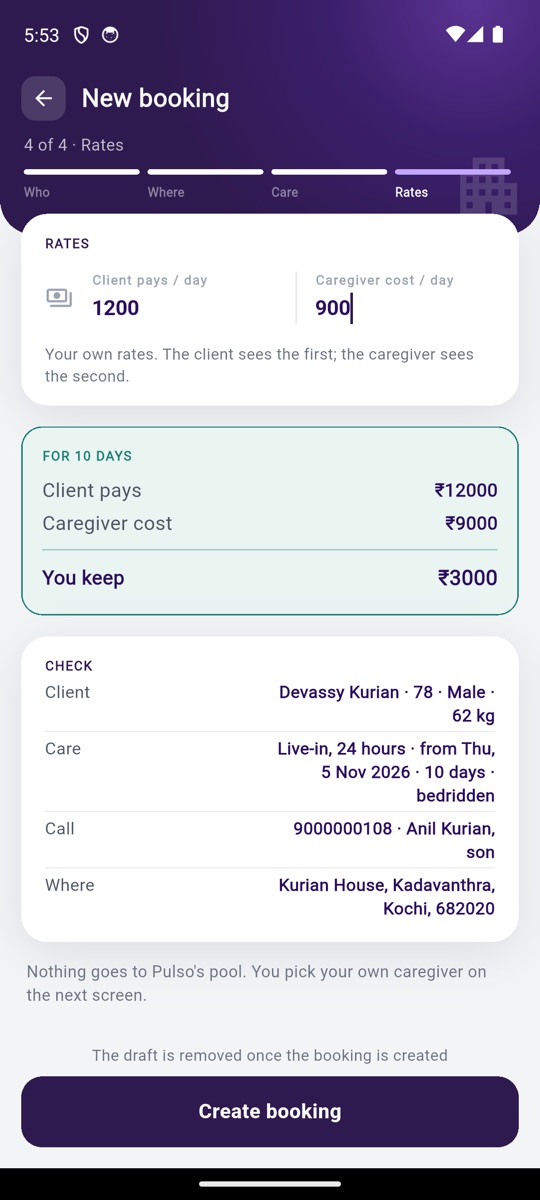
Tap "New booking". Four short pages: "Who needs care", "Where, and whom to call", "Care needed" (the service, start date, days and conditions) and "Rates": your rate per day for the client and the pay per day for the caregiver. Tap "Create booking". You can save a draft and finish later.
Assign your caregiver.
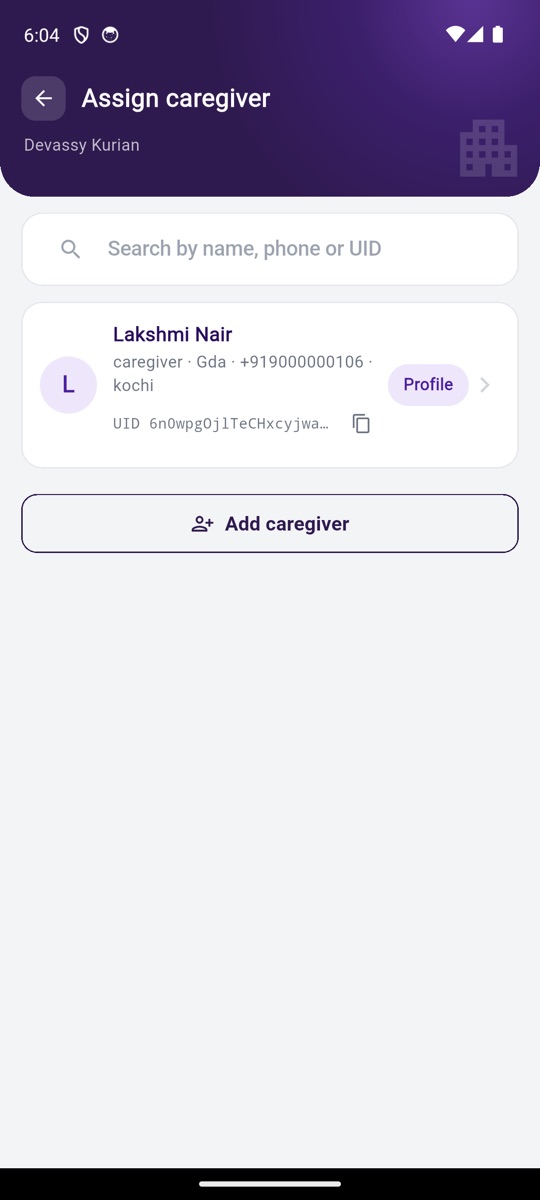
The assign screen opens by itself. Search your own caregivers by name or phone. Tap "Assign caregiver". The booking page shows the "START OTP". Give it to the client, or keep it for the first day.
Watch the duty.
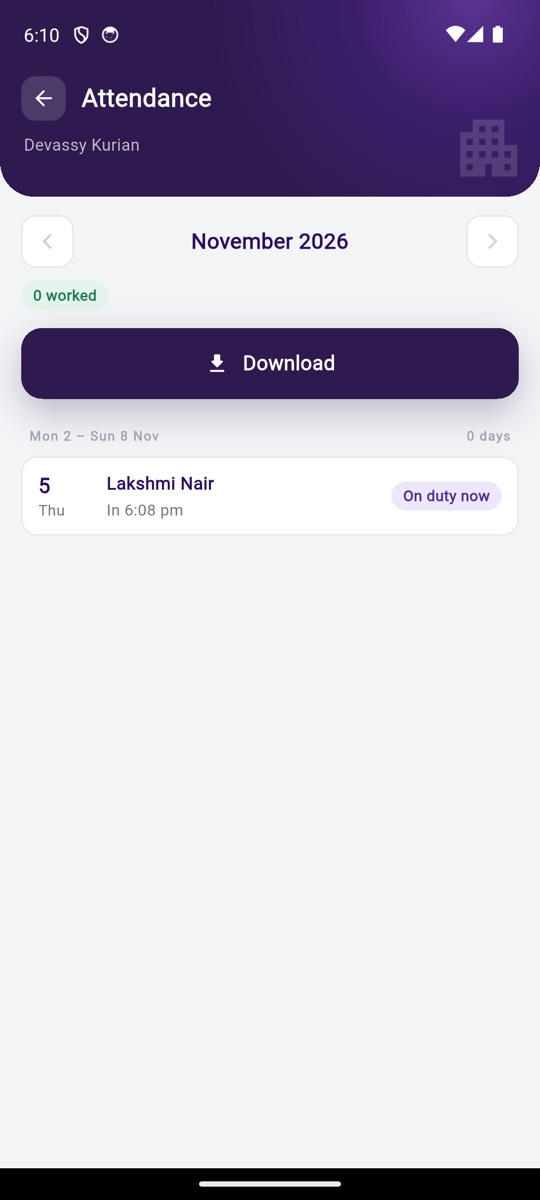
Your caregiver enters the OTP at the client's home and the duty starts. Every day she checks in with a selfie in uniform. Open the booking to see each day: the time and the photo.
Record the money.
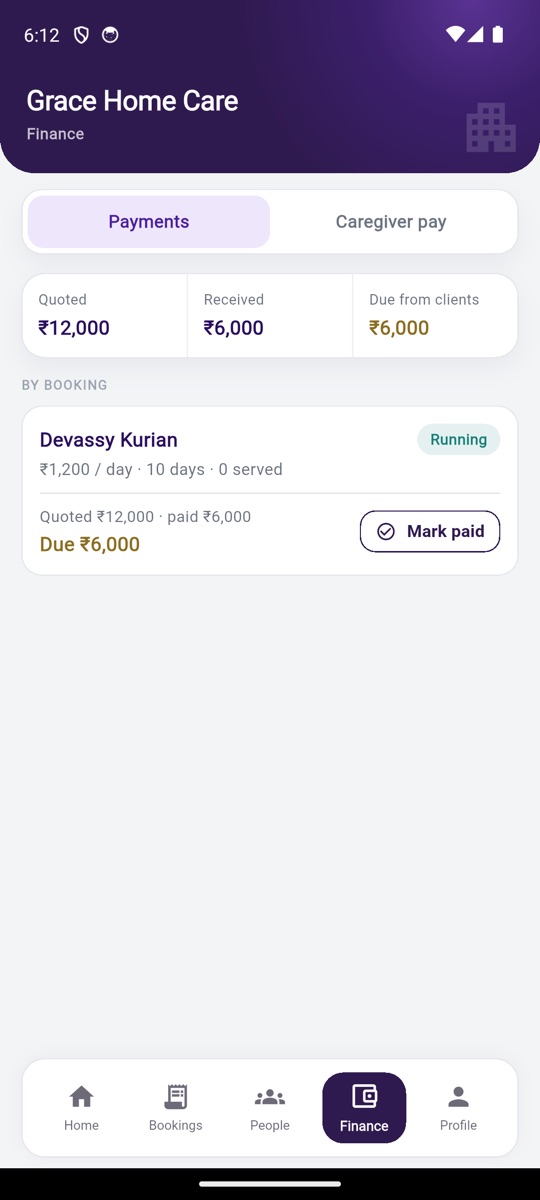
Finance → "Payments": quoted, received, due from clients, by booking. "Caregiver pay": earned, paid, due to caregivers, by caregiver. Tap "Mark paid" and type the amount. Part payments are fine.
Send the papers.
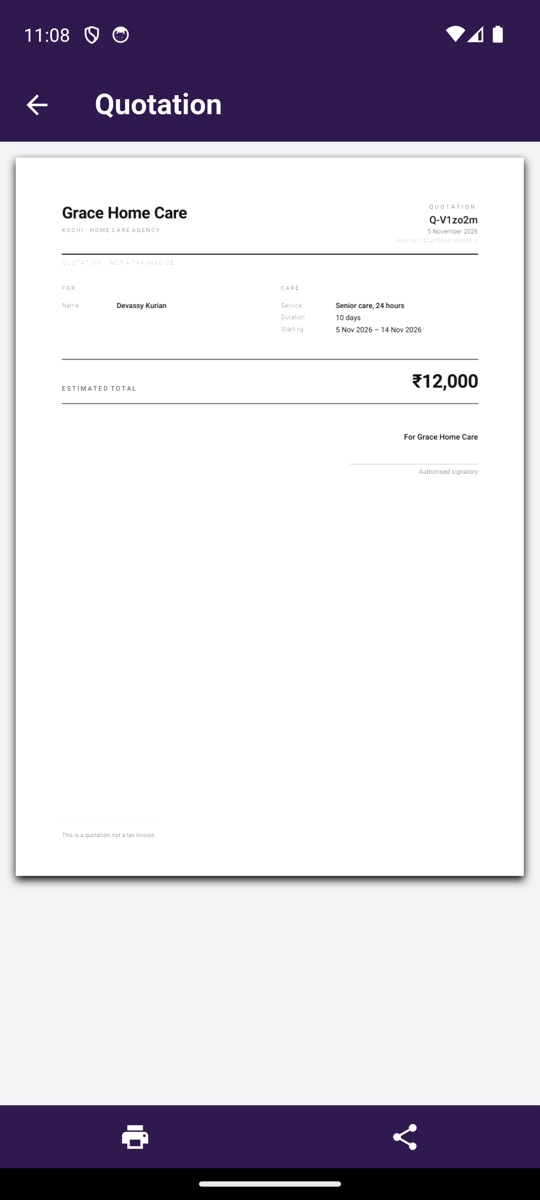
On the booking, tap "Quotation". A PDF in your agency's name: your letterhead, the client, the care, rate × days, total, "For <your agency> / Authorised signatory". After "Mark paid", tap "Receipt" for the same style.
What Pulso does not do
- Pulso does not book your caregivers for anyone else. Ever.
- Pulso does not contact your clients.
- Pulso does not collect money from your clients and does not pay your caregivers.
- Pulso does not show your team, your clients or your bookings to any other agency.
- Pulso does not employ your caregivers. Their duties and pay are between you and them.
Free for 3 months. Then ₹99 a month, tax included.
- What it covers: your clients, your caregivers, bookings, attendance, quotes. One price for the whole agency.
- During the free 3 months nothing is asked. From day 91 the app shows the price.
- If unpaid: no new bookings. Running care continues. Nothing is deleted.
- Pay from the Pulso app on your phone.
Questions agencies ask
Who can sign up?
Any home-care agency in India. No approval, no documents.
Can Pulso see my clients and caregivers?
Only Pulso's support team, for support. Other agencies never do. Pulso never contacts them.
Will Pulso send my caregivers to other work?
No. Never.
Can I use Pulso's caregivers?
Not inside your workspace. In Kerala and Bengaluru you can ask Pulso to supply staff separately. See "Staff from Pulso".
How does my caregiver join?
You add her. She gets a WhatsApp with the app link, signs in with that number, and she is in your team.
Does my caregiver pay anything?
No.
How do my clients pay?
To you, as they do today. Pulso does not collect money for you.
What does it cost?
Free for 3 months, then ₹99 a month, tax included, for the whole agency.
What happens if I do not pay?
Running care continues. No new bookings until paid. Nothing is deleted.
Does it work on a computer?
Yes, at admin.pulso.co.in with the same number.